
First, give Apple Voice Memos credit for what it actually does.
Voice Memos is not just a list of unsearchable files. Apple's current iPhone documentation describes recording transcription and searching recordings by words in the transcription. You can also trim, replace, save or delete recordings. These capabilities may vary by device, system version and language, so check what appears in your own app.
If your goal is “record a good idea while walking, search for it later, and occasionally edit a clip,” start with Voice Memos. It is already on your iPhone. You do not need another subscription or a new account for that basic workflow.
A voice journal answers a different question.
A recording answers “what did I say?” A journal can also help with “why did I say it, what was happening, and has this come up before?” Those are different jobs. Smart Rant is designed for personal moments: you can save the original audio alongside your words, search the archive, and use connected people or subjects where its intelligence is enabled. It does not make every recording profound, and it does not replace your own judgment.
For example, Voice Memos may be all you need to remember the dimensions of a room. For a series of reflections about changing jobs, you might instead want to revisit how your thinking changed over several weeks. See the Smart Rant voice-journal workflow and how moments are captured and revisited.
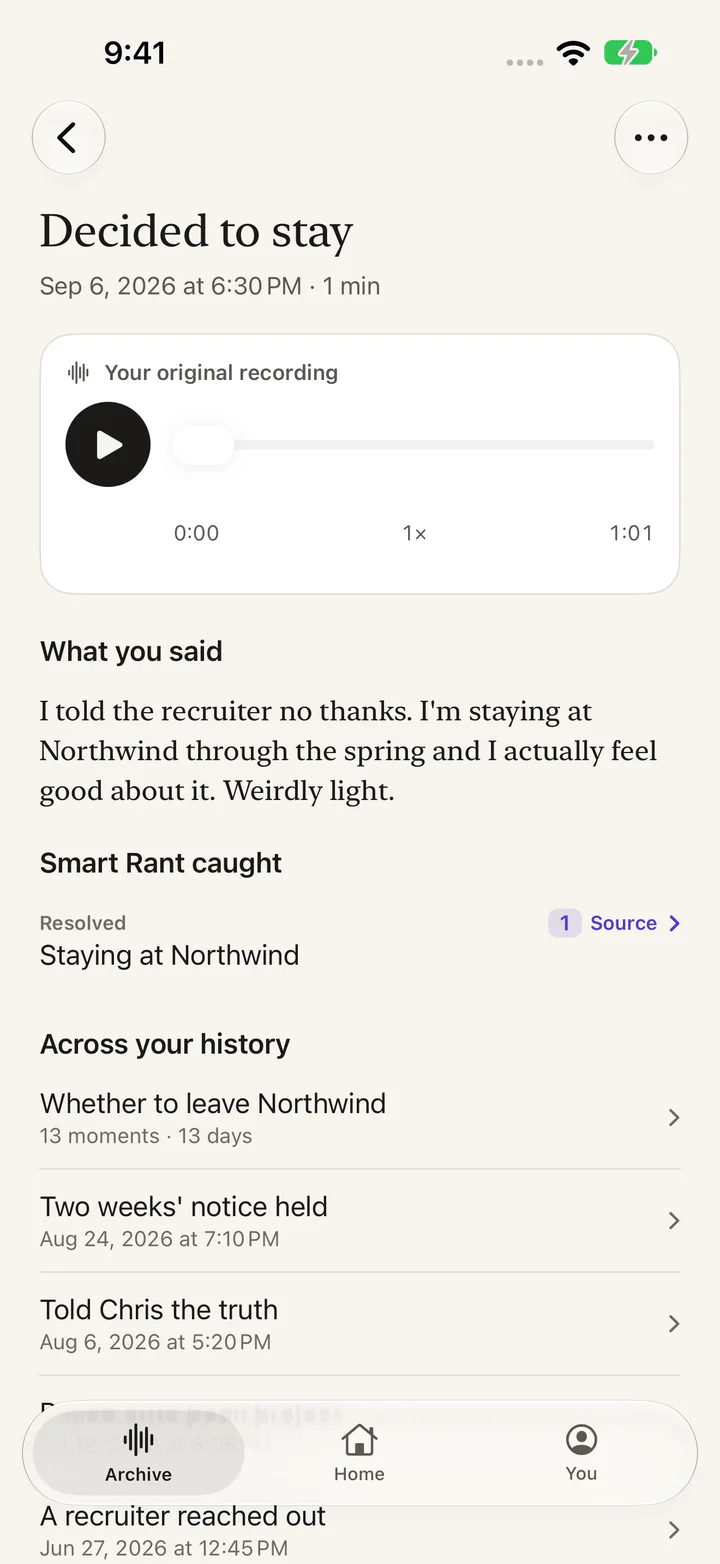
One recording. More context later.
A saved moment keeps the original audio next to what you said. When enabled, related moments can help you revisit what happened before. The example shown uses illustrative content, not your recordings.
Do not switch just for transcription or search.
Those are not exclusive Smart Rant features. Apple's built-in recorder can already provide both in supported situations. A dedicated journal should earn its place through features that help you reflect, organize history, or set different retention boundaries. If none of those matter to you, keeping Voice Memos is a perfectly good decision.
A useful test: record one ordinary idea in Voice Memos and find it again a week later. If that satisfies the job, stop there. If you need to connect it to other personal moments or choose a different keep/discard policy for each recording, compare a journal workflow.
“Private” needs a more specific definition.
Both apps contain potentially sensitive speech. Privacy isn't established by a microphone icon or an app's branding. Ask whether recordings stay on your device, whether cloud sync is enabled, which services process transcripts, whether AI features use the content, and what deletion means. Review your own iPhone and iCloud settings for Voice Memos rather than assuming every recording is device-only.
Smart Rant distinguishes Normal, Private, and Burn recording modes. Normal is intended for moments that can connect into your searchable history. Private is intended to keep saved recordings out of connected AI experiences, with separate transcription permission. Burn is designed for a temporary recording that is never uploaded and is discarded when you stop. Read Smart Rant's privacy policy for current storage and processing details, and choose the mode before saying something sensitive.
This does not make either product the right place for passwords or another person's confidential information. Record in a private setting and get consent where needed. If you do not want an audio file to exist, paper may be a better choice than either app.
Which should you actually choose?
Choose Voice Memos if…
- you mainly capture reminders, interviews, song ideas, lectures or simple voice notes;
- transcription, clip editing and search already meet your needs on your iPhone;
- you prefer not to add another app or subscription;
- you want a general-purpose audio recorder, not an ongoing personal journal.
Consider a dedicated voice journal if…
- you regularly reflect on decisions, people, memories or recurring experiences;
- you want to keep the audio and revisit your words in a personal history;
- you need distinct saved, AI-connected and discard-after-recording choices;
- you understand the privacy settings and want the extra organization enough to use it.
Before changing apps, check the cost of switching.
Do not assume that an app can automatically import Voice Memos recordings into a reflection archive, or that an exported transcript carries its original timing and context. Smart Rant's current public materials do not promise a general automated Voice Memos migration. Try one new entry before committing to a new workflow. Keep the original recording where it belongs until you know what the new app saves and how to access or delete it.
Prefer to start without an app decision?
Try the five-minute brain dump exerciseusing paper or whichever recorder you already own. If you want an ongoing habit, learn how to start a voice journal. For a separate comparison of audio versus written reflection, read voice journaling versus writing.
Apple product behavior was checked against its own iPhone user guide on October 15, 2026:
- Search and rename Voice Memos recordings (Apple Support)
- Edit and delete recordings (Apple Support)
- Voice Memos transcriptions (Apple Support)
- Smart Rant privacy policy and modes (first-party source)
- Smart Rant functionality (first-party source)
This is a comparison published by the developer of Smart Rant, not an independent hands-on laboratory review. Device/language capability and subscription terms can change.